
 EN
EN
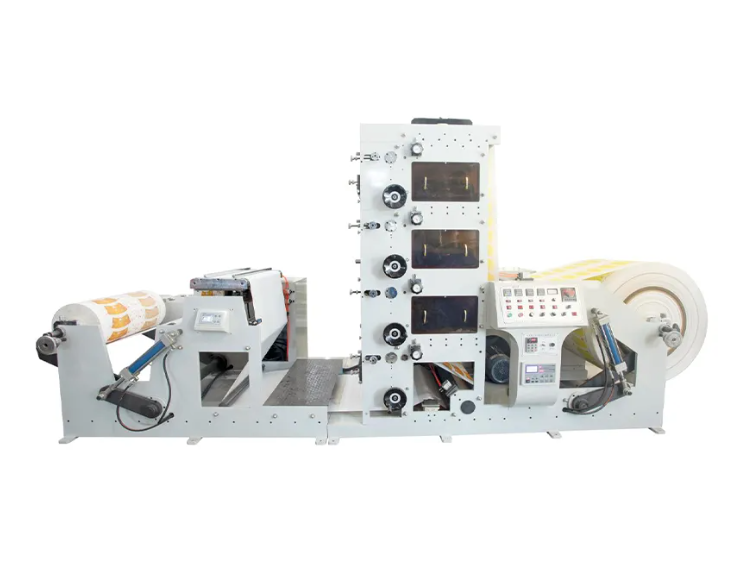
Understanding Why Color Calibration is Important for Flexo Printing
One of the most important qualities of packaging printing is accurate color. When printing on a flexo printing machine, color changes can happen from batch to batch based on changes in ink density, printing pressure, or registration. For manufacturers that use Bonjee flexo printing machines for printing on paper cups, paper bowls, paper cartons, or paper bags, stable color output is essential to meet the standards of the brand and the expectations of the customers. Color calibration makes sure that every flexo printing machine run can be set to the same results. It also reduces machine run waste and setup time.
Getting the Flexo Printing Machine Ready for Calibration
Before you begin color calibration, you need to make sure that the mechanical condition of the flexo printing machine is good. Make sure the rollers are clean, the bearings are lubricated, and the anilox roller does not have any dried ink on it. Bonjee machines have design precision components and stable frames, but good and regular maintenance still is important. Make sure the printing plates are installed correctly. Also, make sure the flexo printing machine is warmed up to its normal operating speed, as colors and ink transfer can be affected by temperature and speed.
How to Ensure the Right Ink is Used and How to Control Color Accuracy
Flexo printing relies on precise control of the printing ink to achieve the best color output, control the color of the ink, and the amount of ink flowing through the press. When using a flexo printing system, it is crucial to always keep to the guidelines specified by the flexo printing ink and paperboard, coated paper, or any other food-grade paperboard. Document and measure the viscometer of the ink, and then, set and adjust the viscometer based on the guidelines of the specific ink supplier. A modern flexo printing system using servo control along with a PLC can control the conveying system to deliver a set volume of color. With consistent setup of the ink, the need to adjust the ink for color correction is kept to a minimum.
Adjusting the Anilox Rollers and Ink Transfer
A highly adjustable Anilox roller is at the core of processing color control on a flexo printing machine. A roller with different line counts can and will affect the amount of ink being transferred to the impression cylinder. When it is time to select a Bonjee flexo printing machine, the Anilox roller can be adjusted using the side screws, uncheck the piston, and pull it towards the machine axis. Bonjee flexo printing machines provide an adjustable anilox, ensuring the pressure of the Anilox roller is perfect to the cylinder, allowing for even and perfect color transfer by the use of no over inking the press.
Setting Impression, Registration, and Pressure
To achieve color consistency on flexo printing machines, correct impression pressure must be achieved. Too much pressure darkens colors and causes dot gain, while too little causes weak and uneven printing. Make adjustments to the impression settings and analyze the test prints. Registration accuracy is important for flexo printing, especially with multiple colors. Bonjee machines are equipped with fine adjustment systems to help operators with precise color alignment on the multi-layer flexo printing machines.
Calibration Using Color Measurement Tools
To achieve professional-level color calibration on flexo printing machines, objective measurement tools must be used. Visual checking is not enough. An important piece of equipment used with density and color value measurement is the spectrophotometer and densitometer. When using these tools, compare the results to reference standards and customer-approved sample adjustments. Measurement data provides the flexo printing machine with operational consistency in color output quality, regardless of the day or the operators, and increases production reliability.
Adjusting Outcomes and Completing Test Runs
Once calibration is completed, complete multiple test runs on the flexo printing machine with production materials. Analyze the color consistency from the start of the run to the end. Make minor adjustments to the viscosity, pressure, or speed of the ink if necessary. Adjust the parameters on the Bonjee flexo printing machines to allow the operators to adjust the parameters to color adjusting with minimal downtime to production. Once color adjustments have been made, record the parameters for easy retrieval for subsequent runs on that same flexo printing machine.
Creation of Procedures for Standard Calibration
Color accuracy on the long-term end of scale is best made with procedures and processes done the same way every time. Develop and create an easy to understand checklist for each flexo printing machine that covers the steps for ink calibration, anilox selection, pressure adjustments, and measuring color. The consistency of results obtained will be improved with the same processes to train the operators on. The combination of a disciplined calibration procedure and the Bonjee flexo printing machine will yield manufacturers on the end of scale consistent colors and improved customer satisfaction with the reduction of waste.
Table of Contents
- Understanding Why Color Calibration is Important for Flexo Printing
- Getting the Flexo Printing Machine Ready for Calibration
- How to Ensure the Right Ink is Used and How to Control Color Accuracy
- Adjusting the Anilox Rollers and Ink Transfer
- Setting Impression, Registration, and Pressure
- Calibration Using Color Measurement Tools
- Adjusting Outcomes and Completing Test Runs
- Creation of Procedures for Standard Calibration